
When a customer uploads a file,
your team can get straight to work.

From receiving large originals to review, revisions and final delivery. Give customers a space for their own files and your team a shared space to get the work done.

Easy file intake.
Ongoing customer collaboration.

Keep the familiar experience of opening a link and uploading large files. Then track who sent what, what’s missing and which results were delivered, all in a space for each customer.

Upload folderRequests and submission status by customer
Download folderReviewed deliverables and completion status
Shared accountA separate space for each customer
Upload notificationAssign an owner and start the next task
File versionsReview, revision, approval and delivery

A space for your customers.
A space for your team.

Customers see only their files and requests in Client Space. Staff review and work on originals in Team Space, then deliver only the results intended for the customer.
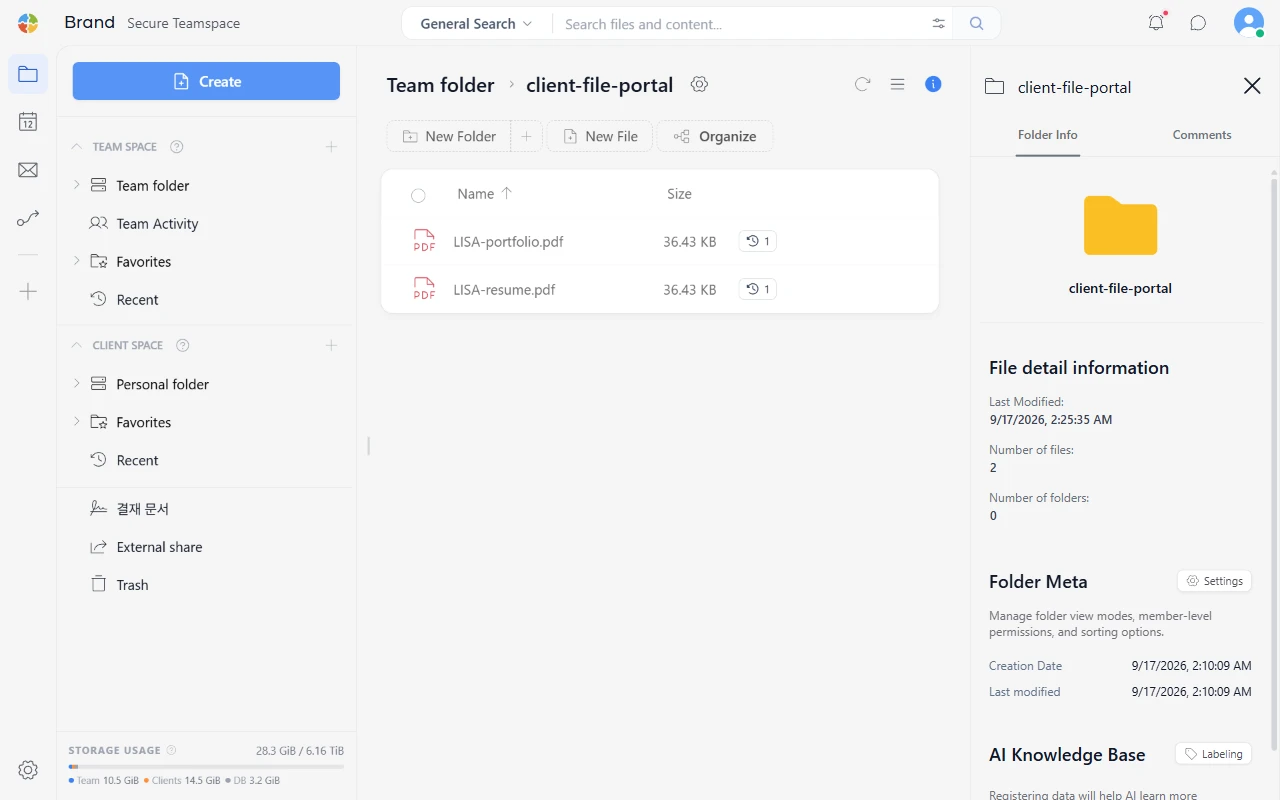
Customer collaboration workspaceClient Space · Team Space
Team folder containing a customer’s submitted business registration and bank account documents
The space your customers seeFiles delivered to your team space

Keep customer files in your own office.

Install SetFN SpaceBuilder on a spare office PC and run a dedicated customer file space on your own storage. Manage access, operating hours and retention according to your policies.

Storage that grows with you

Add HDDs or SSDs and choose your own capacity and costs.

Customer files, on your storage

Keep them directly on your server rather than uploading them to a cloud service.

Your hours and retention policies

Decide how remote access, backups, account removal and disposal work.

Local AI for sensitive information

Configure AI inside your organization to read and organize only permitted data.

Customer’s phoneUpload photos and documents
Customer’s PCSend large original files
Submit files · Check progress · Download results
client.ourcompany.kr
A customer website built in WebspaceYour brand · Login · File submission
Accounts, login, files and permissions connected in real time
A PC running SetFN SpaceBuilderCustomer Client Spaces · Internal Team Spaces · BackupsCustomer files stay on storage you choose

The foundation for customer service
is already in your workspace.

Accounts, personal spaces, permissions and file delivery are already there. See the foundation in the actual product screens.

Manage customer accounts and status in one place.

Use the admin interface for all members, active and pending accounts, and registration policies.

After the files arrive,
work the way your field does.

Connect each step from submission to delivery around the way your industry actually works.

Printing and productionFamiliar file transfer, with production progress built in.

From original artwork to proofs and final files

Receive large artwork and design files by customer, then return the results after internal production and review.

  1. Large-file intake
  2. Proof versions and revision requests
  3. Internal approval and print-ready files
  4. Final delivery through expiring links
Tax and accountingTrack completion, not just incoming folders.

See which customer is missing which document

Manage monthly, quarterly and year-end receipts and supporting document requests with customer checklists.

  1. Document requests by customer
  2. Mobile photo and document submission
  3. Missing-document reminders
  4. Tax filing and reconciliation results
Patents and legalChoose where confidential files live and who can open them.

Separate customer-facing documents from internal reviews

Manage evidence, contracts, drawings and specifications by case, with distinct customer and internal spaces.

  1. Case file intake
  2. Internal opinions and version review
  3. Customer confirmation and additions
  4. Retention of submitted and completed documents
Education and tutoringAs enrollment grows, students still see only their own material.

A submission space for every student

Connect assignments, applications, revisions and results in each student’s own space.

  1. Assignment and application requests
  2. Individual submissions and deadlines
  3. Teacher feedback and revisions
  4. Results and supplementary materials

A customer page built around your business.

The workspace handles sign-up, login, customer files, uploads and permissions. Create the pages where customers request services, track progress and receive results, all around the way you work.

Describe the customer page to AI, then deploy the finished interface to Webspace. Your accounts and files stay connected as the interface evolves.

Example customer page

Build the customer interface around your work, then connect the capabilities already in place.

The customer uploads.
The next task begins.

Add Workflow and AI plugins to connect repetitive intake tasks in the way your team works.

Receive

Accept files through customer spaces, upload links, email or Webhooks.

Organize

Sort folders and filenames by customer and document type.

Check

OCR and AI prepare searchable content and flag possible omissions or duplicates.

Act

Notify the owner and start review, approval and delivery.

AI doesn’t replace professional judgment. It prepares classifications, search results, summaries and items to check.

More customers.
One place to manage accounts and access.

Registration and account statusManage sign-up, approval and inactive accounts.

Teams and rolesSeparate customer contacts from internal operators.

File accessSet available folders and actions by role and level.

Access after a contract endsClose access and apply retention, backup and disposal policies.

An office installation isn’t secure by default. Plan remote access, updates, separate backups and account removal together.

A foundation ready to use.
Extensions that fit your work.

Foundation available now

Team and Client Spaces, files, versions, comments, permissions, external share links, password and expiry controls, download management and Webspace deployment

Customer portal plugin

Customer-to-team mapping, space templates, request checklists, missing-submission alerts, and separate customer-facing and internal comments

Custom Webspace implementation

Branded customer service, CRM, ERP, e-signature and payment integrations, with intake, review and approval screens for your field

Make work easier
for your customers and your team.

Test a real workflow, from customer intake through internal review to final delivery—not just a few file transfers.